Foldbun Annotation

Foldbun Annotation

Image annotation for computer vision

Annotate images with boxes, rotated boxes, polygons, masks and points, classify whole images and transcribe text. SAM 3 proposes objects from a text prompt, and model predictions are evaluated against the ground truth in the same project.

Start free: a personal workspace, daily free credits and a sample project.

  • Web app for desktop browsers, designed for windows at least 1200 px wide. No installation.
  • Sign-in with Foldbun ID, the one account for every Foldbun product.
  • SAM 3 segmentation is served by Foldbun Stack.
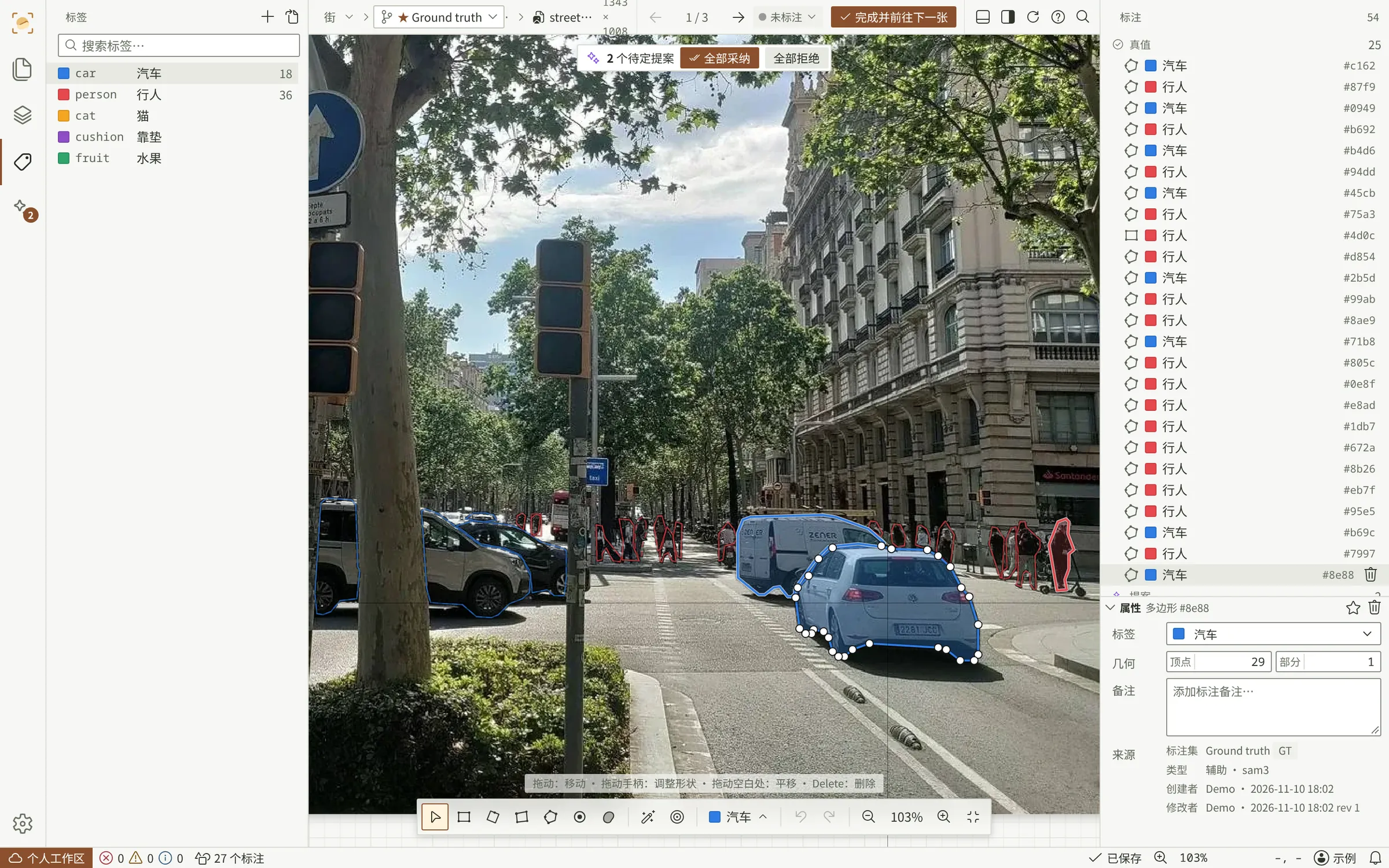
Workbench · street.webpSample data
Foldbun Annotation workbench: a street photo with SAM 3 polygons for cars and people, two pending proposals drawn dashed, the label list on the left and the annotation list on the right.

Manual image annotation

A keyboard-driven workbench for object detection, image segmentation, image classification and OCR datasets.

  • Common geometry types

    Bounding boxes, rotated boxes, polygons with holes, quadrilaterals, points and per-label masks drawn with a brush and eraser. Shapes convert between types from the context menu.

  • Image classification

    Single-choice or multiple-choice classes per image, set with the number keys, with reference images for each class.

  • Text annotation for OCR

    Transcriptions on boxes, rotated boxes and polygons, with illegible and vertical marks, and a review page for checking every transcription.

  • Built-in checks

    A problems panel lists zero-area and out-of-bounds shapes, heavy overlaps within a class, disallowed geometry and missing transcriptions. Each entry opens the shape on the canvas.

  • Keyboard first

    Single-key tools, number keys for labels, undo and redo, and a command palette. Every shortcut can be reassigned.

  • Annotation versions

    Each project holds several independent annotation versions. A version can be merged into the main version or made the main version.
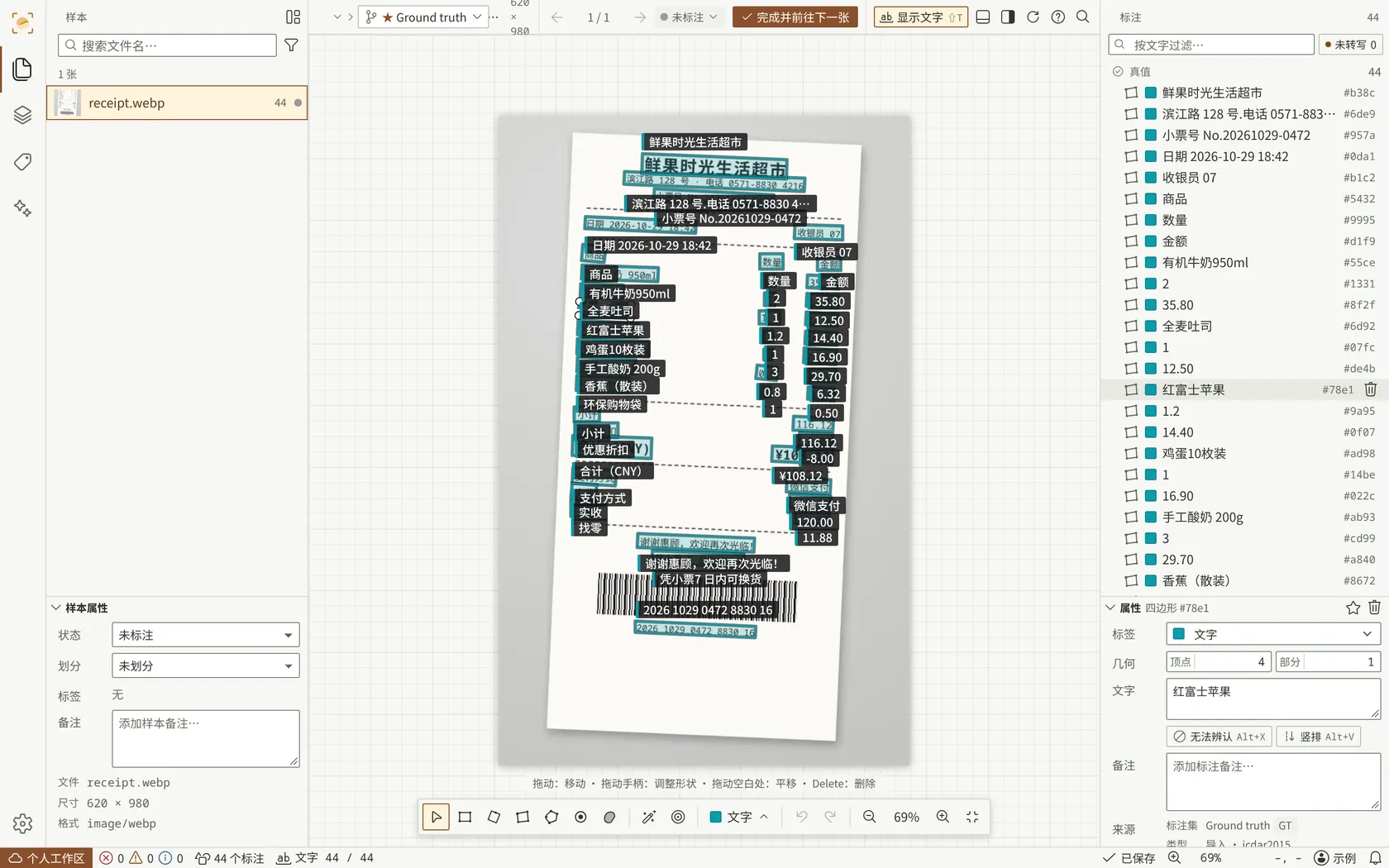
Text annotation in the workbench: quadrilaterals on a receipt, each with its transcription, and the transcription box open for one line.
Text annotation on a receipt (sample data).

Automatic labeling with SAM 3

Model output arrives as pending proposals: nothing becomes ground truth without review or an explicit threshold.

  • Find by text prompt

    A label name or a short English phrase finds every matching object in the current image. SAM 3 returns polygons or masks; a large language model detector returns boxes.

  • Trial runs before full runs

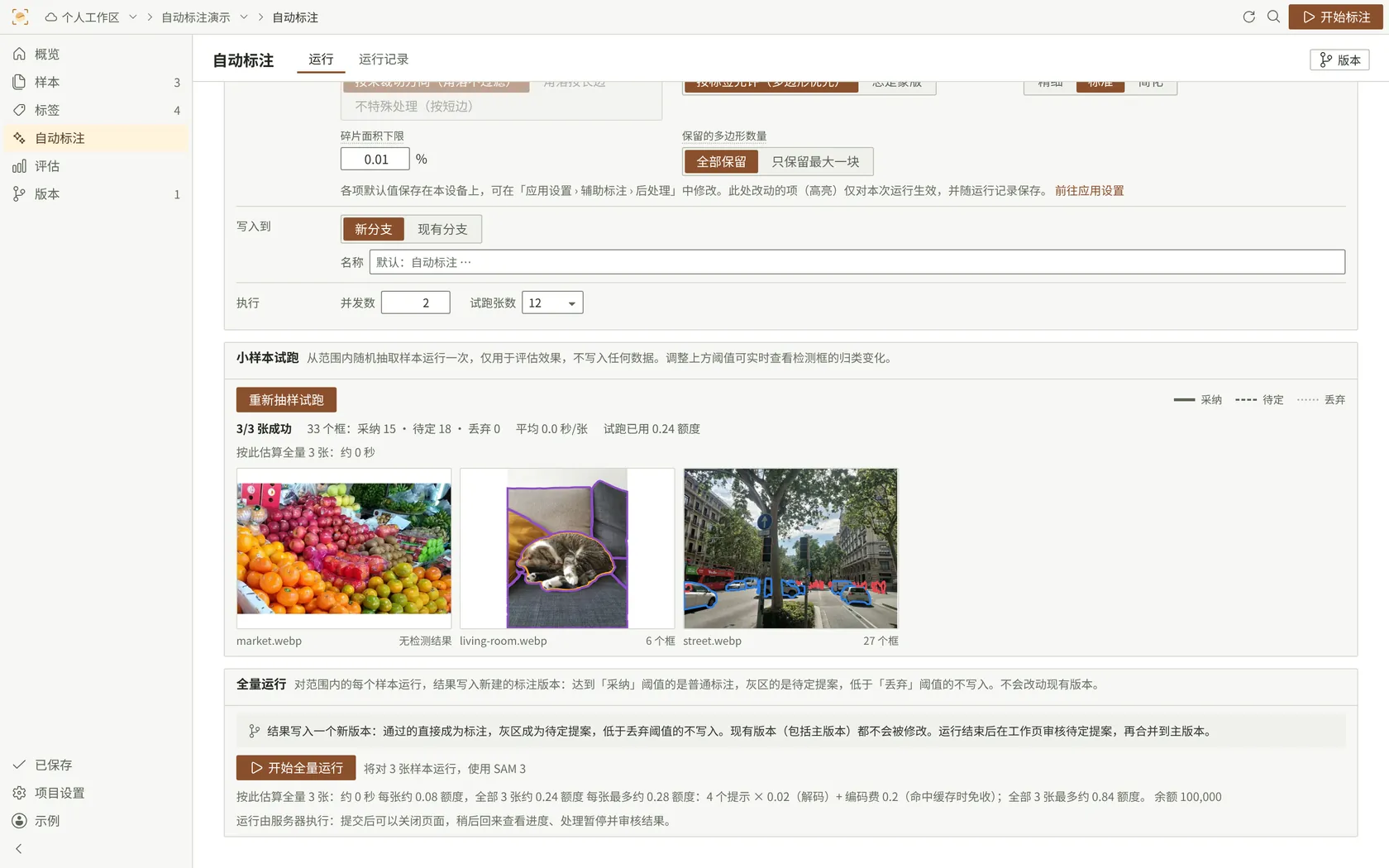
    A pipeline of sample filter, detector, post-processing and label mapping is tried on 8 to 16 random samples, then run by the server on the whole project. Closing the browser does not stop a run.

  • Thresholds per label

    Results above the acceptance threshold become annotations, results in the gray zone become pending proposals, and results below the drop threshold are discarded.

  • Review and merge

    A full run writes a new version. Proposals are accepted or rejected with A and X in the workbench, and the reviewed version is merged into the main version.

  • Prompt tuning

    Candidate prompts for a label are scored against existing annotations on a small sample set, with recall, precision, F1 and a recommended threshold.

  • Usage in credits

    Model calls consume credits of the workspace or its organization. A trial run shows the estimated usage for the whole project before the full run starts.

Automatic labeling page: pipeline settings on the left, a trial gallery of eight images with proposals, and per-label thresholds.
Trial run before a full run (sample data).

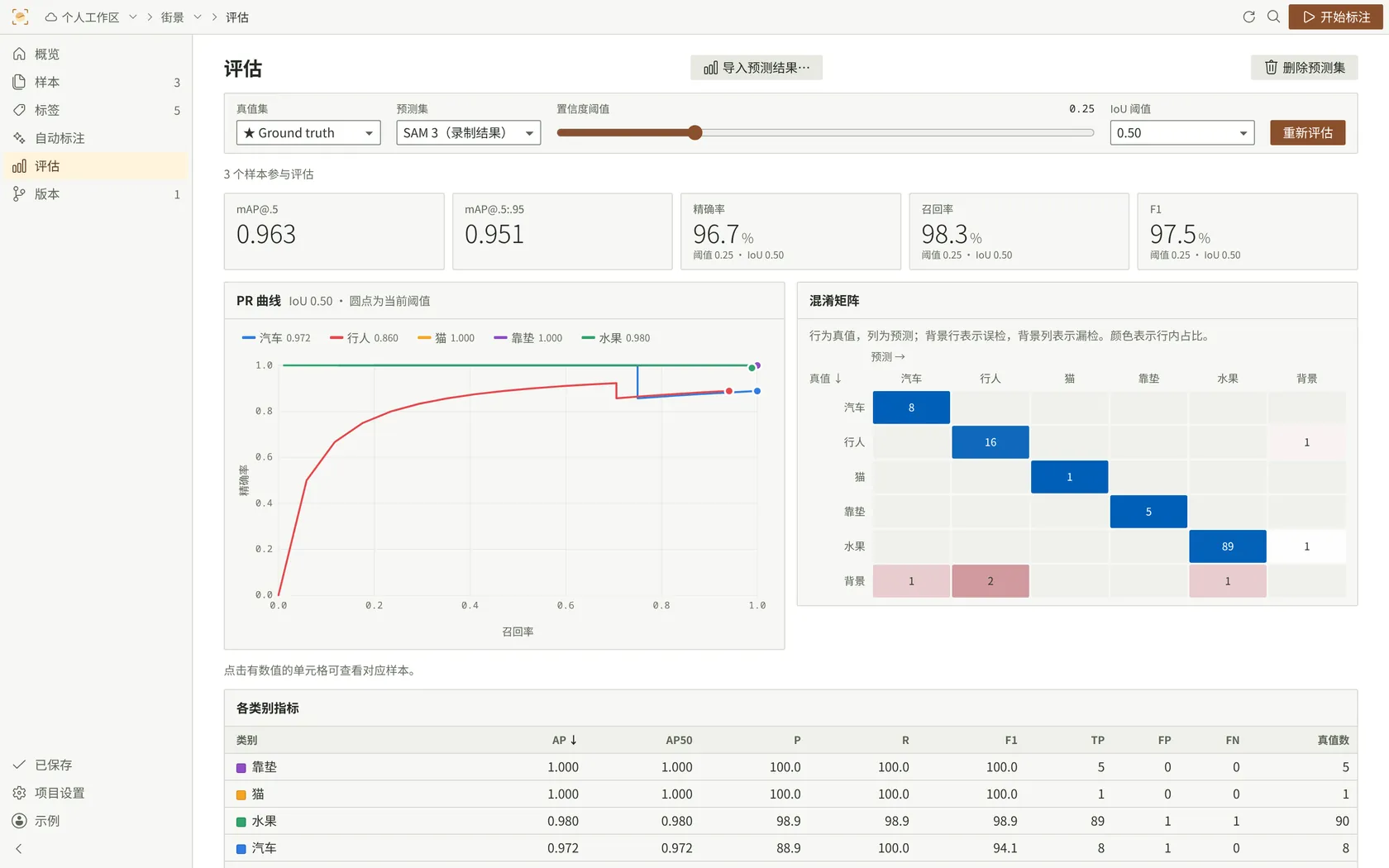
Model evaluation against ground truth

Predictions from any model are imported and compared with the annotations, per class and per image.

  • Detection metrics

    Precision, recall, F1 and AP per class, [email protected] and [email protected]:.95, PR curves and a confusion matrix whose cells open the matching samples.

  • Segmentation and text metrics

    IoU per class, mIoU and pixel accuracy for masks; end-to-end precision, recall and F1, character error rate (CER) and exact-match accuracy for OCR.

  • Errors on the image

    True positives, false positives and false negatives are drawn on each image, with a confidence slider that applies immediately. A false positive becomes a pending proposal in one step.

  • Prediction formats

    COCO results JSON, YOLO text files with confidence, single-channel PNG class masks, and ICDAR or PaddleOCR results for text.

Evaluation report: per-class precision, recall and AP, a precision-recall curve and a confusion matrix.
Evaluation report (sample data).

Workspaces, organizations and permissions

Data labeling as a team: shared projects, roles per project and edit locks per image.

Project roles and the actions they allow
RoleViewAnnotateAssisted labelingDataExportManage project
ManagerYesYesYesYesYesYes
EditorYesYesYesYesYesNo
AnnotatorYesYesNoNoNoNo
ViewerYesNoNoNoNoNo

Workspaces

Projects live in workspaces. Workspace owners and administrators invite members and guests by link and decide whether images may be sent to model services.

Organizations

An organization groups workspaces and holds the credit balance and resource quotas. Workspace budgets and monthly limits per member are set within it.

Edit locks

An image being edited is locked for other members, and their changes appear without reloading the page.

Dataset import and export formats

Datasets are imported with their annotations and exported in the formats that training pipelines expect.

Supported annotation formats
FormatImportExportNotes
COCO (detection, instance segmentation)YesYesPolygons and RLE masks; text field for OCR
YOLO (detect, segment, OBB)YesYesClass indices, optionally compacted
Pascal VOCYesYesIncluding SegmentationClass PNG
ICDAR 2015YesYesQuadrilaterals with text; ### marks illegible text
PaddleOCR detectionYesYesLabel.txt
PaddleOCR recognitionNoYesCropped images and rec_gt.txt
  • Folders, files and datasets are recognized automatically and checked for duplicates on the local computer; images can be downscaled or converted to WebP before upload, and interrupted uploads resume.
  • Exports are taken from a chosen annotation version; pending proposals are never exported.
  • Not supported: COCO panoptic, DOTA, generic semantic segmentation PNG and video.

Frequently asked questions

How is access to Foldbun Annotation granted?

Sign in with Foldbun ID to get started. Every account gets a personal workspace, a sample project and daily free credits; team workspaces are joined by invitation.

Which devices are supported?

The annotation workbench is a web app for desktop browsers, designed for windows at least 1200 px wide. Annotation on phones and narrow windows is not supported.

Which interface languages are available?

The interface is in Simplified Chinese. Some pages are also available in English.

Which models does automatic labeling use?

SAM 3 for segmentation and detection from text prompts, served by Foldbun Stack, and a large language model detector for bounding boxes.

Where are images sent during automatic labeling?

Only features that call a model send images, and only to the service that runs that model: Foldbun Stack for SAM 3, an external large language model provider for detection. Workspace owners and administrators can turn off each kind separately, and an organization can turn them off for all of its workspaces.

Which annotation formats can be imported and exported?

COCO, YOLO (detect, segment, OBB), Pascal VOC, ICDAR 2015 and PaddleOCR. Details are in the formats table above.

How is usage charged?

Manual annotation does not consume credits. Model calls consume credits held by the workspace or its organization. Prices are not published at this stage.

Is video annotation supported?

No. Foldbun Annotation works with still images only, and very large images are rejected at import.

Foldbun Annotation — image annotation for computer vision

Manual annotation, automatic labeling with SAM 3 and model evaluation in one desktop workbench.